How to verify a certificate with the laboratory: the ILS portal, step by step
Verifying a certificate means retrieving the laboratory's own copy and checking that it matches the one you were given. For ILS Laboratories, open the verification link printed on the certificate, or enter its access code at ils-lab.com/verify; both lead to the laboratory's record. For BTLabs, each report on our lot pages links to the laboratory's verification copy.
A certificate is only as good as the confidence that it is the laboratory's document, unchanged. A PDF can be edited by anyone who has it; the laboratory's own record is held by the laboratory, not by whoever sells the material. This note walks through checking one of our certificates with each laboratory that tests our lots, step by step, using real examples you can follow yourself: the ILS Laboratories certificate for BPC-157 (certificate reference 030284) and the BTLabs reports for SS-31 (certificate reference 060722).
What does verifying a certificate prove, and what does it not?
It proves that the laboratory issued a certificate with this content, for this sample. If the copy you hold differs from the laboratory's record, the record is the reference.
It does not prove anything about an individual vial. A certificate describes the sample the laboratory received, and our vials are not individually lot-numbered, so no certificate can be matched to one vial (our testing standard explains this). Verification answers "is this the laboratory's document?", not "is this vial the tested sample?".
Where are the verification details printed?
On an ILS Laboratories certificate, in two places. The header carries a QR code with the words "Scan to verify authenticity at ils-lab.com" and an access code beneath it; the footer of each page repeats the access code and prints the verification link with the report number. For 030284 these are:
- Report number: COA-2026-955273
- Access code: 4FT5KXQ2
- Verification link: https://portal.ils-lab.com/verify/EccT-Ei875_DeEJH
We print the same link and access code with the certificate on the BPC-157 product page, so you do not need the PDF to start.
How do you verify an ILS certificate, step by step?
There are two routes to the same record. When we followed both on 2026-10-23 they led to the same address[2].
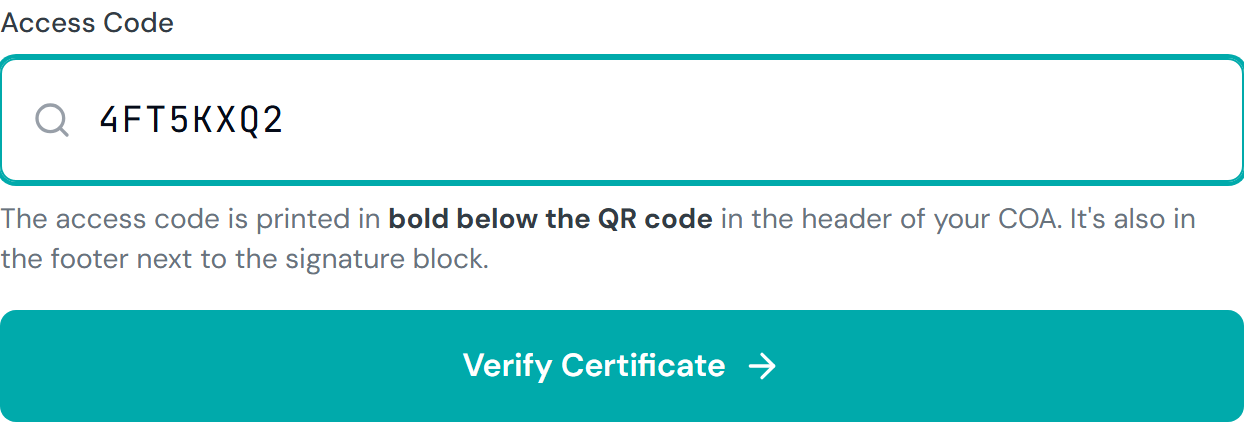
- Find the access code. On the certificate it is in the header under the QR code and in the footer beside the report number. For 030284 it is 4FT5KXQ2.
- Open the laboratory's verification page. Go to ils-lab.com/verify, which ILS Laboratories titles "Verify a Certificate of Analysis"[1]. Type the address yourself rather than following a link from a seller, including us; that way you know which site you are on.
- Enter the access code. Type it into the "Access Code" field and press "Verify Certificate"[1].
- Check where you landed. The browser moves to the laboratory's portal, on the portal.ils-lab.com address. For 030284 this is the same address as the verification link printed on the certificate[2].
- Compare the record with your copy. Read the portal's product, lot number, dates and test rows against the certificate, row by row. The table below lists what to compare.
- If anything differs, stop. Treat the laboratory's record as the reference and contact the laboratory, and us, before relying on the copy.
The shorter route skips steps two and three: open the verification link printed on the certificate, or scan the QR code in its header, and continue from step four. The longer route is worth the extra minute when you did not receive the certificate from the laboratory directly, because it starts from an address you typed.
What should you compare, row by row?
The fields that identify the document come first, then the measurements. Each value in the middle column is what our record of the certificate holds; the portal shows the same fields[2].
| Field | On the certificate for 030284 | Check that the portal shows |
|---|---|---|
| Report number | COA-2026-955273 | The same report number |
| Lot number | 030284 | The same lot number |
| Analysis date | 2026-08-07 | The same date |
| Peptide purity (HPLC) | 99.72% | The same figure |
| Net peptide content | 10.7 mg (Report Only) | The same figure and specification |
| Identity | BPC-157, Confirmed | The same finding |
| Endotoxin (USP <85>) | 0.101 EU/mL, Reported | The same value and status |
| Sterility (PCR) | No Growth, PASS | The same finding |
A portal page can present rows in its own layout, with its own labels and wording. What must match is the content: the identifiers and every figure. If a row reads differently between the two, ask the laboratory which is its reference, and tell us.
How do you verify a BTLabs report?
You verify a BTLabs report through the verification link each report carries on our lot pages, which opens the laboratory's own copy.
Our records hold no access code for the BTLabs certificates. Instead, each report on our lot pages links to the laboratory's own verification copy. For SS-31, certificate reference 060722, the lot page lists three reports: the purity and potency certificate COA261149-004, the endotoxin report COA261149-018 and the sterility report COA261149-011, each with a link to the laboratory's copy.
- Open the lot page and choose a report.
- Follow its verification link. The link opens on the verify.btlabtesting.com address.
- Identify yourself to the laboratory. Our lot pages note that BTLabs asks for a name and a quick check before it shows a report. When we opened the link for COA261149-004 on 2026-10-23, the page was headed "Verify Your Identity", asked for a full name and an email address, and offered to send a verification code[3].
- Compare the laboratory's copy with the report on our page: the report number, the lot number, the date tested and each figure.
What can verification not catch on its own?
It cannot catch a genuine certificate attached to the wrong material, or anything else told around the document; those checks remain yours.
A laboratory's record confirms a document. It cannot confirm the story told around the document, so three checks remain yours.
- A genuine certificate for a different batch. The record proves the laboratory issued this certificate for this lot number. It does not prove that a seller attached it to the right material. Check that the product name, the labelled content and the lot number on the laboratory's record are the ones you were told; on our site, each certificate is published beside the product it belongs to, under its certificate reference.
- A genuine certificate for a different size. A certificate states the labelled content it tested: 10 mg for 030284. Where a product comes in several sizes, check whether the certificate covers yours; our product pages say so for each size.
- An old certificate. A certificate is dated. Check the analysis date (2026-08-07 for 030284) and ask whether the material in question comes from that batch.
None of these needs special access. Each is a comparison between the laboratory's record and what you were told about the material.
What if the copies do not match?
Treat the laboratory's record as correct and the copy as suspect, whoever gave it to you. Tell the laboratory, which can confirm what it issued, and tell us through our contact page, naming the certificate reference and the report number. Every released lot's certificate is listed on the certificates page, and the laboratories page lists each laboratory's lots with the verification route our records hold for it.
What does a verified certificate still not tell you?
Verification settles who issued the document. It does not change what the document says. A verified certificate still describes one sample; its "Report Only" rows are still measurements without a limit; and a purity certificate that excludes endotoxin still excludes it. For reading the content itself, start with how to read a certificate of analysis.
Every figure on this page that describes an Elyria Bio lot is generated from the same certificate records that feed the product pages and the certificates page, and is read from the laboratory’s own certificate. What a lot must meet before release is set out in our testing standard; who tests our lots, and how, is on the laboratories page. Any other statement of fact cites its source in the list below.
All Elyria Bio products are Research Use Only (RUO) in-vitro laboratory reference materials. They are not for human or veterinary consumption and are not drugs, foods, cosmetics, or dietary supplements. Nothing on this site is medical advice or a dosing recommendation. Purchasing or using these materials in any way that violates this policy or applicable law is strictly prohibited.
Sources
- Verify Certificate of Analysis | ILS Laboratories. ILS Laboratories. Link and title checked 2026-10-23.
- ILS Labs Client Portal: Certificate of Analysis (COA-2026-955273). ILS Laboratories. Link and title checked 2026-10-23.
- Verify Your Identity (BTLabs verification copy of report COA261149-004). BTLabs. Link and title checked 2026-10-23.